Ink Search: AI Coding
28 May 2025A while back, I decided I wanted to write a letter to my son “from Santa” every year for Christmas morning. I’ve been slowly falling down the rabbit hole of collecting and writing with fountain pens, so I wanted to find a nice ink that felt Santa-y for these letters. I went to my go-to fountain pen addiction enabler, r/fountainpens, for inspiration. I naively searched “santa ink” and saw dozens and dozens of posts from the previous years’ Secret Santa ink exchange. Not exactly what I was looking for. I then turned to ChatGPT, which suggested “red ink.” Again, not helpful, I wanted a specific ink to go buy.
So I built an AI-powered ink recommender. I wanted it to take a simple input like “letter from Santa” and use ChatGPT to expand that into a description of the ink, like “a deep red ink with gold shimmer,” then match that against a database of ink descriptions.
My primary concerns were:
- Handling load and scaling – If I post this site to r/fountainpens and even a small percentage of its 350k subscribers hit the site, I didn’t want it to fall over.
- Managing OpenAI API costs – This ended up not being an issue, their API is very affordable. But I wanted to make sure that the site wouldn’t blow through my API credits in a day.
- Development time – I have an infant son, so I don’t have the time to dedicate to side hustles like I used to. I prioritized AI-powered coding and Claude ended up writing ~75% of the app.
Ink Search is what I came up with, a simple web interface for searching for fountain pen inks using natural language queries.
The Application

The app itself is a pretty straightforward Flask app with 3 routes, / for the website and /api/query and /api/query/<id> for interacting with the OpenAI API. POST requests to /api/query put the query on the redis queue and return a job ID. GET requests to /api/query/<id> can be made as soon as the job is saved, and will return a “Still processing” message if the job isn’t finished, or a list of ink results if it is.
Celery picks jobs up from redis, makes the OpenAI API requests, and stores the results. All data storage is in Postgres, using the pgvector extension to natively store high-dimensional vectors representing ink descriptions.
Querying
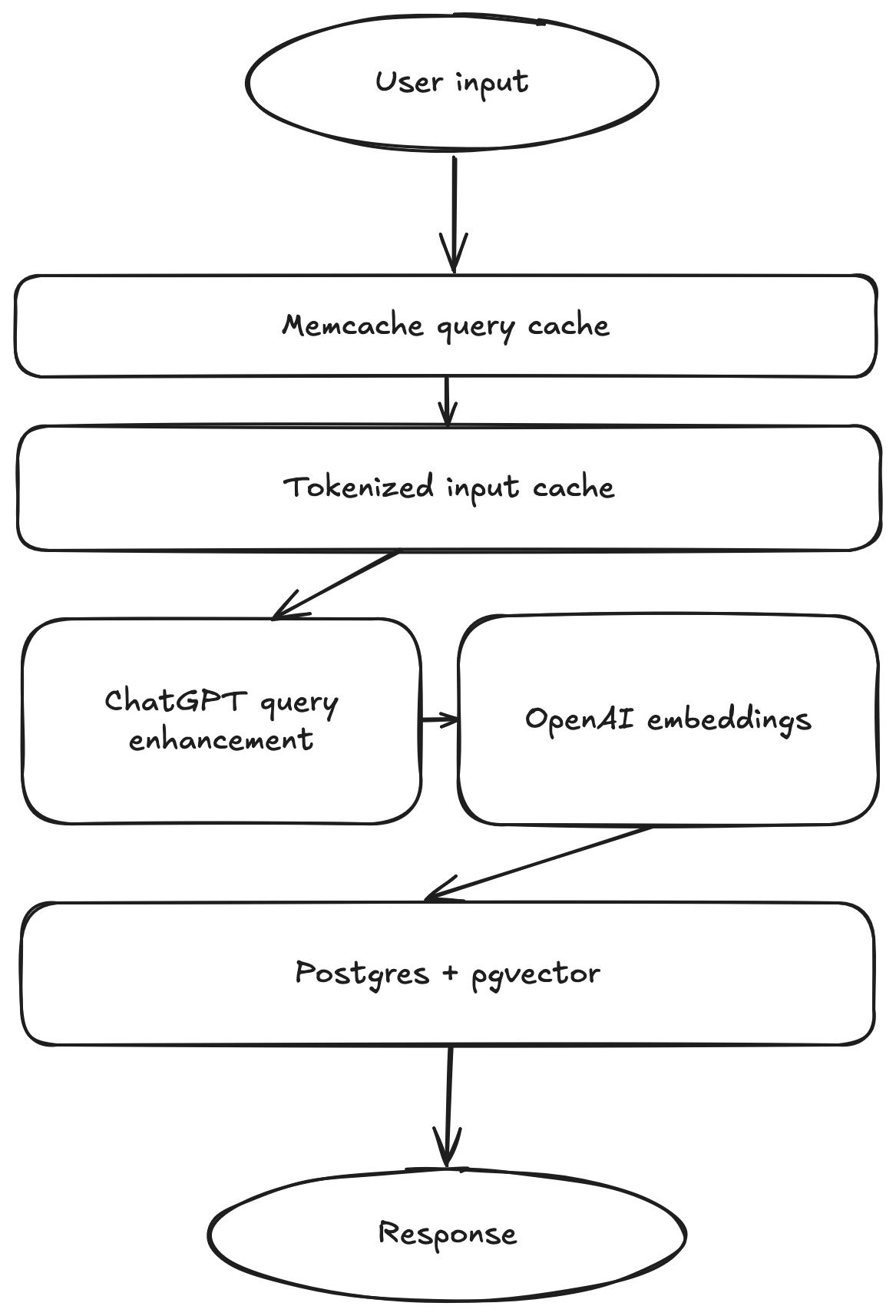
Queries have multiple levels of caching to ensure fast responses and efficient use of OpenAI resources.
The first cache level is Memcached caching of unique query results. This comes in very handy for pagination of results in the app. The API only returns 5 results at a time, but the query returns all 25 results that are possible to be viewed in the app, so requests for additional pages of results don’t even hit Postgres.
The next level of cache is a tokenized query caching system. This ensures that queries that are similar, but not exactly the same as a previous query, for example “A letter from Santa” and “Santa letter,” will not generate unique AI signatures. The cache tokenizes queries into words, drops common stopping words like “a” and “the,” and sorts the list of tokens to generate a cache key. If the query has a cached record in Postgres, the API returns its results right away instead of submitting a new job to Celery and hitting the OpenAI API.
Finally, if a query is actually unique, two requests are made to OpenAI’s API. The first is to the ChatGPT API, asking it to provide a 1-2 sentence description of an ink that matches the user’s query. That description is then encoded into a vector using the Embeddings API and stored in Postgres.
The actual query to compare encoded queries to encoded descriptions is a simple Euclidian distance.
Coding with AI
This was one of the first projects I tackled primarily as a “project manager” with AI writing the majority of the code. I did some refactoring manually and a good amount of debugging to get everything working, but the majority of code powering this was written by AI.
I was impressed with how well Claude 3.5 Sonnet handled boilerplate tasks. From Dockerfiles to the whole HTML frontend, Claude wrote large amounts of code I had no real interest in working on. Web design is definitely not my passion, so asking it to build a UI with basic specifications and getting a pretty much fully functioning site back was pretty liberating to me.
I was not impressed, however, with its ability to debug. In one particular instance, I asked it to add pagination functionality and the Javascript function it created didn’t work. After a few rounds of asking it to fix it by feeding it the error message I was seeing in the console, I just did it myself. There were a few instances of that sort of failure to follow an error message and reason around it.