28 May 2025
A while back, I decided I wanted to write a letter to my son “from Santa” every year for Christmas morning. I’ve been slowly falling down the rabbit hole of collecting and writing with fountain pens, so I wanted to find a nice ink that felt Santa-y for these letters. I went to my go-to fountain pen addiction enabler, r/fountainpens, for inspiration. I naively searched “santa ink” and saw dozens and dozens of posts from the previous years’ Secret Santa ink exchange. Not exactly what I was looking for. I then turned to ChatGPT, which suggested “red ink.” Again, not helpful, I wanted a specific ink to go buy.
So I built an AI-powered ink recommender. I wanted it to take a simple input like “letter from Santa” and use ChatGPT to expand that into a description of the ink, like “a deep red ink with gold shimmer,” then match that against a database of ink descriptions.
My primary concerns were:
- Handling load and scaling – If I post this site to r/fountainpens and even a small percentage of its 350k subscribers hit the site, I didn’t want it to fall over.
- Managing OpenAI API costs – This ended up not being an issue, their API is very affordable. But I wanted to make sure that the site wouldn’t blow through my API credits in a day.
- Development time – I have an infant son, so I don’t have the time to dedicate to side hustles like I used to. I prioritized AI-powered coding and Claude ended up writing ~75% of the app.
Ink Search is what I came up with, a simple web interface for searching for fountain pen inks using natural language queries.
The Application

The app itself is a pretty straightforward Flask app with 3 routes, / for the website and /api/query and /api/query/<id> for interacting with the OpenAI API. POST requests to /api/query put the query on the redis queue and return a job ID. GET requests to /api/query/<id> can be made as soon as the job is saved, and will return a “Still processing” message if the job isn’t finished, or a list of ink results if it is.
Celery picks jobs up from redis, makes the OpenAI API requests, and stores the results. All data storage is in Postgres, using the pgvector extension to natively store high-dimensional vectors representing ink descriptions.
Querying
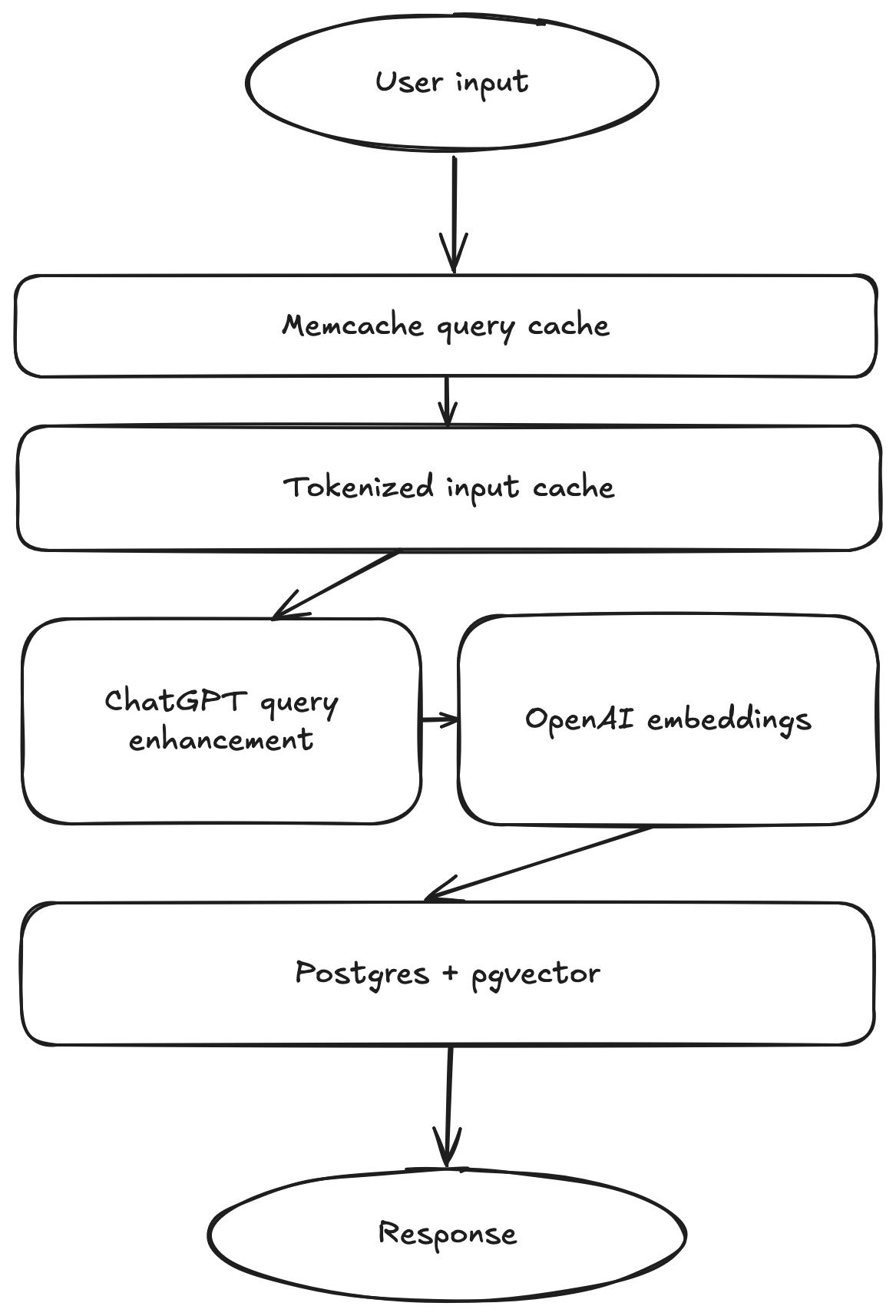
Queries have multiple levels of caching to ensure fast responses and efficient use of OpenAI resources.
The first cache level is Memcached caching of unique query results. This comes in very handy for pagination of results in the app. The API only returns 5 results at a time, but the query returns all 25 results that are possible to be viewed in the app, so requests for additional pages of results don’t even hit Postgres.
The next level of cache is a tokenized query caching system. This ensures that queries that are similar, but not exactly the same as a previous query, for example “A letter from Santa” and “Santa letter,” will not generate unique AI signatures. The cache tokenizes queries into words, drops common stopping words like “a” and “the,” and sorts the list of tokens to generate a cache key. If the query has a cached record in Postgres, the API returns its results right away instead of submitting a new job to Celery and hitting the OpenAI API.
Finally, if a query is actually unique, two requests are made to OpenAI’s API. The first is to the ChatGPT API, asking it to provide a 1-2 sentence description of an ink that matches the user’s query. That description is then encoded into a vector using the Embeddings API and stored in Postgres.
The actual query to compare encoded queries to encoded descriptions is a simple Euclidian distance.
Coding with AI
This was one of the first projects I tackled primarily as a “project manager” with AI writing the majority of the code. I did some refactoring manually and a good amount of debugging to get everything working, but the majority of code powering this was written by AI.
I was impressed with how well Claude 3.5 Sonnet handled boilerplate tasks. From Dockerfiles to the whole HTML frontend, Claude wrote large amounts of code I had no real interest in working on. Web design is definitely not my passion, so asking it to build a UI with basic specifications and getting a pretty much fully functioning site back was pretty liberating to me.
I was not impressed, however, with its ability to debug. In one particular instance, I asked it to add pagination functionality and the Javascript function it created didn’t work. After a few rounds of asking it to fix it by feeding it the error message I was seeing in the console, I just did it myself. There were a few instances of that sort of failure to follow an error message and reason around it.
15 Apr 2022
My Homelab hasn’t grown much in terms of hardware the last few years but has grown in terms of usability. Since I’m tearing everything down for a move this weekend, it’s a good time to re-evaluate where I am in terms of hardware and services.
Hardware
My Homelab is very modest hardware-wise: I have two servers and a small amount of networking equipment. I have very little need to grow the hardware at this point.
Eriador: NAS
Eriador is a re-purposed desktop PC that runs as a NAS. It has one primary pool (Media) which consists of 3x4TB WD Red drives, and a backup pool (Backup) which is just an 8TB WD MyBook that mirrors the primary pool.
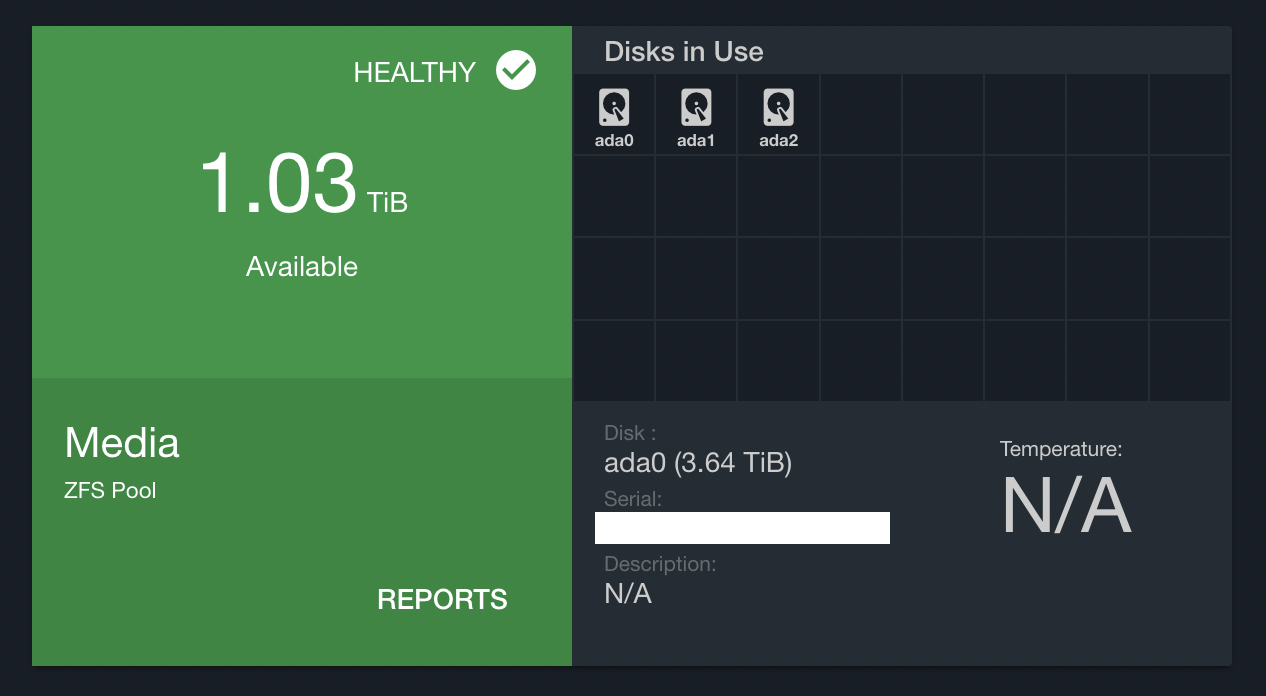
I have several projects in mind for after our move that will require much more storage, so this machine is a primary candidate for an upgrade. The case it is in cannot handle any more drives, so upgrading this likely means all new hardware.
Rivendell: Virtualization
Rivendell is an Intel NUC that runs Proxmox. Proxmox hosts all of the services I host internally as either LXC containers or virtual machines. I still have plenty of room to grow on this NUC, it’s about 50% utilized in terms of memory usage and disk space.

The nice thing about Proxmox is it is clusterable by default, so expanding this machine would just entail buying another NUC and installing Proxmox. That’s a long way off though, this single node should be plenty for the next few years.
Networking
My networking stack consists of the stock Google Fiber router, a plain gigabit switch, a couple of Orbi wifi routers, and a Raspberry Pi 4 running Wireguard. I have a Qotom-Q190G4N that ran opnsense for about 2 months before the box completely died. I haven’t been able to figure out what happened there, but I would like to revisit that in the next apartment. The Orbis have been rock solid since I got them 5 years ago, probably overkill for the size of place I’m living in now.
Services
I self-host a lot of stuff, some of it used daily and some used never. Below are the services I use in order of their importance and usefulness.
This is my primary password manager and I use it every day. Incredibly easy to get started and very reliable. The vault is backed up to Eriador and offsite storage nightly, with an additional encrypted plain text export manually taken whenever I think about it stored in a different offsite account.
While I don’t access the Pi-hole interface very often, it is the whole network’s default DNS server and therefore is used constantly every day. I run this on an LXC container, not a Raspberry Pi.
Ampache is a music streaming service I use daily with various Subsonic clients on my laptops and phone. It serves as the single source of truth for my music library.
This is a new addition. I’ve been a happy Feedly customer for years but their new features are exclusively targeted at premium users, and they’ve started injecting ads into my feed, so tt-rss is replacing Feedly. I have a POC of this up and love it so far, just waiting till after the move to make it official since there will be significant downtime between places.
Nextcloud is my replacement for Dropbox, I use it primarily for documents I’ve scanned and need access to quickly from many devices. This is currently very under-utilized and I have a long backlog of things I want to move to Nextcloud, primarily for safety. Nextcloud is backed up nightly to Eriador and offsite storage.
Photo storage solution, never used. I want to move to something more flexible after the move, haven’t decided what yet. All photos from my devices are automatically backed up to Eriador nightly, and in theory should feed the photo storage service directly. Chevereto does not support that use case.
I have a few basic dashboards built in Grafana that read from InfluxDB, which collects stats from various servers and containers. Rarely used.
Dashboarding software I use with internal and external databases for dashboards. Haven’t touched this in 2 years.
Planned projects
I have a few homelab projects planned for this year:
Self-hosted Youtube
In constant pursuit of my goal of avoiding “The Algorithm,” I plan on mirroring Youtube channels I watch to a Peertube instance and just use that to watch content chronologically. I’m very perceptible to Youtube rabbit holes, so if I can blackhole youtube.com in Pi-hole I’ll probably be 30% more productive every day. This project will require a lot of disk space, so expanding my NAS is a prerequisite for this.
Self-hosted video surveillance
I have used Wyze cameras in my home for years with no complaints, however their security record is a little lacking lately and pushing video from inside my home to the cloud is a privacy nightmare. I plan on setting up Zoneminder on a new server and installing a few wifi cameras to a dedicated surveillance VLAN with no Internet access.
09 Mar 2021
Just some thoughts on a modern ETL and data warhouse stack that is:
- Managed. Low overhead, serverless when possible.
- Infinitely scalable. Easily adding processing resources and storage capacity.
- Modular. Easy to add new sources, fault tolerant across pipelines.
- Batch. Batch latency should be scalable, with the ability to shorten batch length to provide sub-hour updates.
- Modeled. The final product should not be soupy lake of data files we need to pre-process before using.
To go fully managed, a service like Stitch provides the easiest solution for extracting data from source systems. I’m personally not a huge fan of a fully-SaaS extract layer since there will always be something that isn’t supported by the service, so now you’re paying the premium for managed and you need to run your own custom extracts as well.
I’d prefer to implement a modular extract using Singer, the open source framework Stitch is built on. This would provide most of the benefits of using Stitch (they don’t open source some of their more profitable integrations) while also allowing for flexibility for custom integrations using the same tap and target framework.
To make a custom Singer-based extract layer more managed, it could be deployed as container flows to a managed container service like AWS ECS or GKE.
The most scalable transformation solution is no transform. Storing data in raw extract format (which, if using Singer, should be consistent in terms of file type and structure) and building a data lake on top of it takes no processing. While there are advantages to this solution, I don’t think it fits our criteria:
- Traditional partitioning structures prohibit scaling batch latency. Once you start to partition your data into dates, changing to hourly batches is going to cause problems.
- Data lakes can be modeled, but relational databases must be. Using a warehouse will enforce our final requirement by default.
If data lakes are out, we have two remaining options: transform and load, or load and transform.
Using an intermediary processing layer, data is first transformed to the final modeled state, then loaded into the warehouse. The practicality of this approach depends on the desired state of the data. If the model is a traditional star schema with fact and dimension tables, the intermediary step could get very complex.
The managed options for the intermediary processing layer are plentiful. Amazon offers EMR for Hadoop and Spark jobs, and Glue for a more opinionated approach to data transformation. Google has Dataproc for Hadoop and Spark jobs. There are also dedicated Spark-as-a-Service options like Qubole and Databricks.
On the other hand, raw data can be loaded directly into the warehouse and then transformed into the model. This approach makes creating and updating dimensions and de-duplicating fact tables easier. However, it also requires a lot of processing power on the warehouse side. Luckily there are several warehouses that meet that requirement and more on the market.
- Snowflake: The hot new thing in data warehouses, Snowflake offers a product that is infinitely scalable in every sense of the term. Data is stored in S3 or GCS, so there is effectively no limit on the amount of data you can store. Processing is done by disparate warehouses that can be sized according to their task: exploratory analysis can be done on an X-Small instance while a full table refresh ETL process uses a Medium instance and a Data Science model runs on a 4X-Large instance.
- BigQuery: BigQuery is Google’s managed data warehouse, and offers all of the features Snowflake has without thinking too hard about them. Storage is unlimited and processing power is effectively unlimited (although there are some limits that become abundantly obvious with large enough jobs.) BigQuery is more opinionated with their SQL dialect and discourage INSERT statements in favor of their API-driven load statements, but the result is the same.
- Redshift: Old reliable, Redshift has been available since 2013. Its age has pros and cons: it is very mature and ubiquitous, if you have a problem with Redshift there are probably 20 Stack Overflow questions with solutions for it. On the other hand, new features are very slow to be released because it has such high expectations for stability. Redshift recently added RA3 nodes which allow storage and compute to be decoupled, so clusters no longer need to have nodes added just because storage space is running out. Between RA3 and Spectrum, Redshift is keeping up with the competition and is still a viable product for infinite scalability if speed can be sacrificed for stability.
No matter the warehouse, dbt is making great strides in making ELT cross-platform and pragmatic. dbt would be my tool of choice for transformation logic.
Why Not Both?
It is rare that any large-scale data platform is going to have every data source fit neatly into either of the two boxes detailed above. The ideal solution would be to support both:
- A Spark- or Hadoop-based pre-processing tool to handle batches of large stand-alone data sets that don’t need a lot of modeling. For example, web server logs. The final destination for this raw data need not be the warehouse, some summarizing could be preformed to save space and encourage users to not query the raw event logs using a warehouse that isn’t designed for it.
- A dbt-based ELT process to handle batches of relational data that fit into a traditional star schema. For example, orders and transactions. The final destination for this transformed data is the warehouse.
Orchestration
There are a ton of exciting orchestration tools being built right now because, let’s face it, the last generation of scheduling and orchestration tools were not fantastic. Below are the options I am aware of and excited about.
- Airflow: Airflow rose like a rocket from an open source side-project at AirBnB to a top-level Apache project in a matter of a few years. It is currently the go-to standard for ETL orchestration and has a lot of good things going for it – a huge community, fantastic motivated maintainers, and a rich set of python tools. Airflow can also be deployed as a managed service using GCE Cloud Composer, Amazon MWAA, or Astronomer.
- Dagster: Dagster is another Python-based orchestration tool that implements some opinionated paradigms about how pipelines should be built. Like Airflow, pipelines are defined in Python rather than using configuration files. Dagster is designed to run the ETL code itself, as opposed to Airflow where the tide is shifting to using container-based operations. Dagster does not have a managed offering that I am aware of, so deployment would need to be self-managed. One major pro of Dagster is it is not a scheduling engine, which would lend itself nicely to an event-driven platform in which batches are scheduled at any interval, rather than on a fixed schedule like the rest of these tools.
- Prefect: Prefect is an orchestration tool designed to be run as a managed service. While they do have an open source version, to unlock the potential of the platform the managed version is a must. Like Airflow and Dagster, pipelines are defined in python and pipelines are designed to be coupled with ETL code.
- Argo: Argo is a Kubernetes-native orchestrator and scheduler. Argo uses YAML files for pipeline declaration, which means you lose some of the dynamic generation capabilites of code-based pipelines, but it also means your orchestration is fully decoupled from your ETL code.
Since the orchestration tool ecosystem is being distrupted so rapidly right now, at this moment I would prefer to choose a system where strong decoupling is possible. If your orchestration tool is just being used to schedule tasks in a container environment, it is very easy to move to the next great tool to come along with very low switching cost.
Alerting and Monitoring
Even resilient and well-architected pipelines break sometimes. Alerting and monitoring tools are critical to catching problems early and fixing them quickly.
Alerting
There are a ton of great alerting options, even some built in to the orchestration tools, which let you flexibly and intelligently send alerts to the team when things are going wrong.
- Pager Duty is a SaaS product that sends notifications to on-call engineers.
- Amazon SNS is an API provided by Amazon that sends notifications through email or SMS.
- Datadog Monitors is a service provided Datadog that sends alerts when metrics are in dangerous zones. This is a nice complimnetary service to their excellent monitoring offering.
Monitoring
I’ll separate monitoring into two types: monitoring infrastructure, and monitoring quality.
For monitoring infrastructure, the cloud providers have built-ins which work (Cloudwatch, Cloud Monitoring), but the player to beat in the space is Datadog. In addition to industry-leading monitoring and dashboarding, they offer alerting and log storage and tracing and even monitor serverless functions.
For monitoring data quality, I like Sisense to be able to quickly spin up dashboards using pure SQL. Redash is a self-hosted and open-source option that provides the same functionality, but Sisense is managed and polished.
Putting it all together
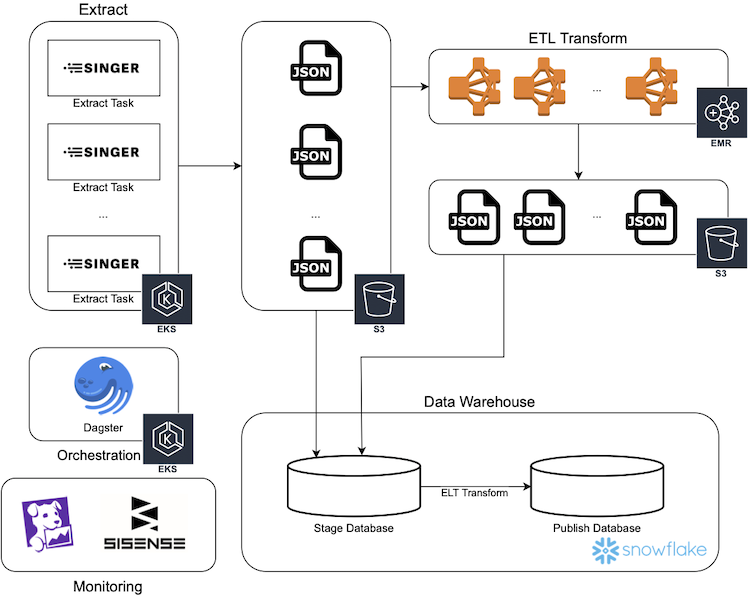
This diagram illustrates an implementation of a modern ETL platform using AWS services.
The solution described here meets our criteria:
- Managed. No servers need to be spun up and maintained, everything is serverless, managed, or SaaS.
- Infinitely scalable. Aggressively buying in to Kubernetes and auto-scaling easily lets capacity increase on the extract side, EMR and Snowflake are inherently scalable and even offer auto-scaling options for a no-thought solution.
- Modular. The design of the extract process allows extracts to operate independently. Our two-legged transform allows data to be handled the smartest way for each individual data source.
- Batch. Batch size can be adjusted at the scheduler level and the rest of the pipeline will scale accordingly.
- Modeled. Snowflake tables can be modeled to match the source system or designed in a traditional star or snowflake schema.
23 Jan 2021
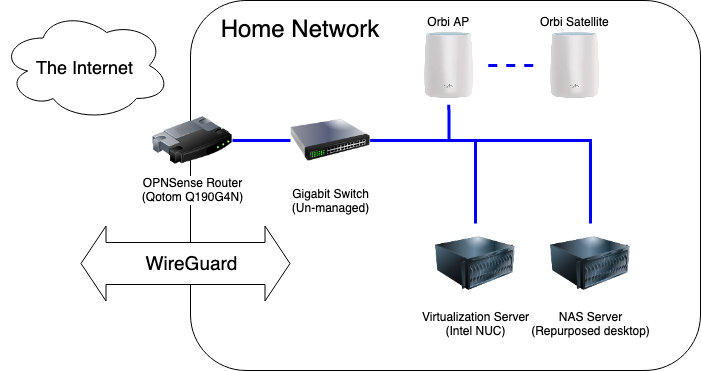
I recently completed several upgrades to my home network to improve privacy, security and VPN performance.
Previous State
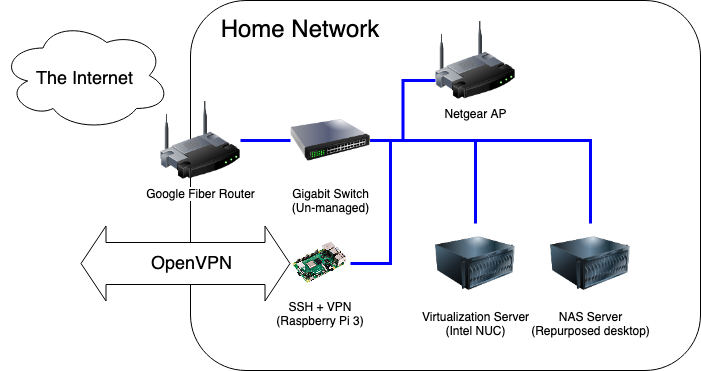
Living in Downtown Nashville has its perks, and one of the biggest ones for me was having my choice of several Gigabit fiber options in my apartment. I have Google Fiber, and was using the Google-provided router with no real issues. The web admin portal was easy to use and albeit simple, provided the basic tools I needed to configure the network the way I liked it: port forwarding, DHCP range limiting. The only problem was, it felt icky going through a Google site to change settings on my local router.
Additionally, OpenVPN has been an issue. OpenVPN is known to not be the fastest VPN option, and I was not doing myself any favors by running it on a Raspberry Pi 3 – its NIC is only 100Mbps, so I would never be able to saturate my gigabit connection even if its CPU was up to the encryption overhead of OpenVPN. I think this speed test says it all:

Making OpenVPN’s slowness even more painful was the fact that I had to be on the VPN in order to use many homelab services, even within the network. This was due to DNS hosting, since I didn’t trust my cobbled-together DNSmasq implementation (also on that Raspberry Pi) to be stable, I never made it the network-wide default.
Upgrades
First on the list was fixing my DNS problem. I wanted a solution that was:
- Reliable. DNS going down is not an option when I am working from home and my wife is in remote classes.
- Ad-blocking. This was already in place with my existing DNSmasq solution.
- Private. The increasing monopolization of DNS resolving by large Internet companies is concerning, and I am sick of sending 1.1.1.1 my data.
I spun up a virtual server to run Pi-Hole for ad-blocking and unbound for DNS resolving. This was my first time using Pi-hole after hearing about it for years, I am quite pleased with the results so far. I added my homelab service DNS entries to it and made it the default DNS network-wide, so I no longer need to use a VPN to access those services.
Second on the list was replacing the Google-provided router with one running pfSense. I bought a Qotom Q190G4N with an 4-core Intel Celeron J1900 and 8GB of RAM, it packed plenty of punch for my needs and comes in a small heavy-duty case. Installing pfSense and configuring it to mirror my previous set up took less than an hour.
Finally, I axed OpenVPN. I replaced the Raspberry Pi 3 with a 4GB Pi 4 and installed Wireguard using PiVPN and passed the port through my shiny new firewall. Client configuration is no harder than OpenVPN (copying config files from the server) and much easier for the mobile client using the QR code option.

The speed difference is night and day. I haven’t been able to fully test the speed of the VPN from outside of the network because I am able to saturate every outside network I try.
Overall, my couple hundred dollar upgrade made my network much faster and easier to use. Below are some of the guides I followed while setting things up.
Resources
Router
Wireguard VPN
DNS configuration
Speedtest
27 Dec 2020
I had high hopes for reading in 2020, my year goal on GoodReads was 30 books. I hit 26 in 2019, not counting re-reading the whole Harry Potter series, so 30 seemed attainable. I usually read for 2 hours every work day on my commute to and from work, but after commuting was canceled in March my reading dropped off precipitously. I did manage to read 16 books this year (17 if I finish Point B,) and that’s not too shabby. Below are the books I read and some short reviews if I remember anything about them.
Dark Matter by Blake Crouch (GoodReads)
This was my favorite book of the year. The plot twists and turns and folds in on itself like Inception and the character development is well done. The premise is outlandish and futuristic, but explained in such depth that it comes off as totally believable.
The Hitchhiker’s Guide to the Galaxy by Douglas Adams (GoodReads)
I did not enjoy this book. I read it because it seemed like I was the only person on Earth who hadn’t done so. The hype surrounding the book led the actual book to be a complete let-down for me. I did not like the writing style or the humor. The best thing I have to say about it is that it’s short.
Bonk by Mary Roach (GoodReads)
Mary Roach is one of my favorite non-fiction authors. This book, like all of her work, is well-researched, full of interesting stories and facts, and tinged with enough humor to make an otherwise dry topic engrossing.
The Big Sleep by Raymond Chandler (GoodReads)
I read this because of the second season of You on Netflix. I liked it.
Play It as It Lays by Joan Didion (GoodReads)
See above. This was my first attempt at Didion, and I liked it a lot. I’ve been meaning to read some of her investigative work as well but haven’t gotten around to it.
Horrorstor by Grady Hendrix (GoodReads)
Pulpy horror novel set in an IKEA-esque furniture store. A fun, quick read.
Full Throttle by Joe Hill (GoodReads)
A good collection of horror short stories and a novella (Into The Tall Grass) that was adapted as a movie on Netflix. The novella is much better than the movie.
Maid by Stephanie Land (GoodReads)
I read this because it ended up on someone’s must-read books list in 2019. It was a bleak glimpse into the life of underpaid domestic workers.
The Ride of a Lifetime by Robert Iger (GoodReads)
Bob Iger is one of the biggest figures in the modern American entertainment industry. He revolutionized the way a movie studio can make movies and make money. His memoir is a fascinating look into his early career and his headlining moments as head of Disney. I found it lacking much of a narrative flow, it was more like bullet points of his accomplishments, failures, and defining moments. Still a good read for any Disney, Pixar, Marvel, or Star Wars fan.
The Stand by Stephen King (GoodReads)
Yes, I re-read the apocalyptic pandemic novel during a real-life pandemic like everyone else. One of my favorite King books.
The Hate U Give by Angie Thomas (GoodReads)
I blew through this book during the protests following the murder of George Floyd. Despite being a work of fiction, its plot and themes were eerily similar to the real-life situation in the Summer of 2020. Well-written with mostly well-developed characters.
The Southern Book Club’s Guide to Slaying Vampires by Grady Handrix (GoodReads)
Another Hendrix book. I like his writing style, his stories don’t revolve around the horror like most horror novels do, they feel more real with believable characters who happen to be fighting a vampire.
Rise of the Warrior Cop by Radley Balko (GoodReads)
I did not enjoy reading this book, but I am glad that I did. It provides great historical context to the current state of policing in America. Its stories of police violence and overreach are enraging and heartbreaking.
Blood Meridian by Cormac McCarthy (GoodReads)
This may have been the hardest novel to get through that I’ve ever read. The writing is dense and meandering, the dialogue is often hard to decipher. Its depictions of war and violence are stomach turning and gruesome (this coming from a big fan of horror novels.) I had to read a synopsis to understand the ending.
Mexican Gothic by Silvia Moreno Garcia (GoodReads)
I loved this book. A fantastic take on gothic horror.
Blacktop Wasteland by S.A. Cosby (GoodReads)
Fun heist novel with some good twists. Light and breezy read.
Point B by Drew Magary (GoodReads)
I have not finished this yet, but I love Drew Magary’s other novels and am enjoying this book so far.